Free educational tool
Understand your AI workflow. Build practical AI skills.
For anyone who uses an AI chat for a task, query or project. Build AI literacy by turning the traces still available in your conversations into a visual workbook: what you requested, what AI proposed, which decisions appeared and what could be documented better.

Complete synthetic example
First understand the process. Then improve the next one.
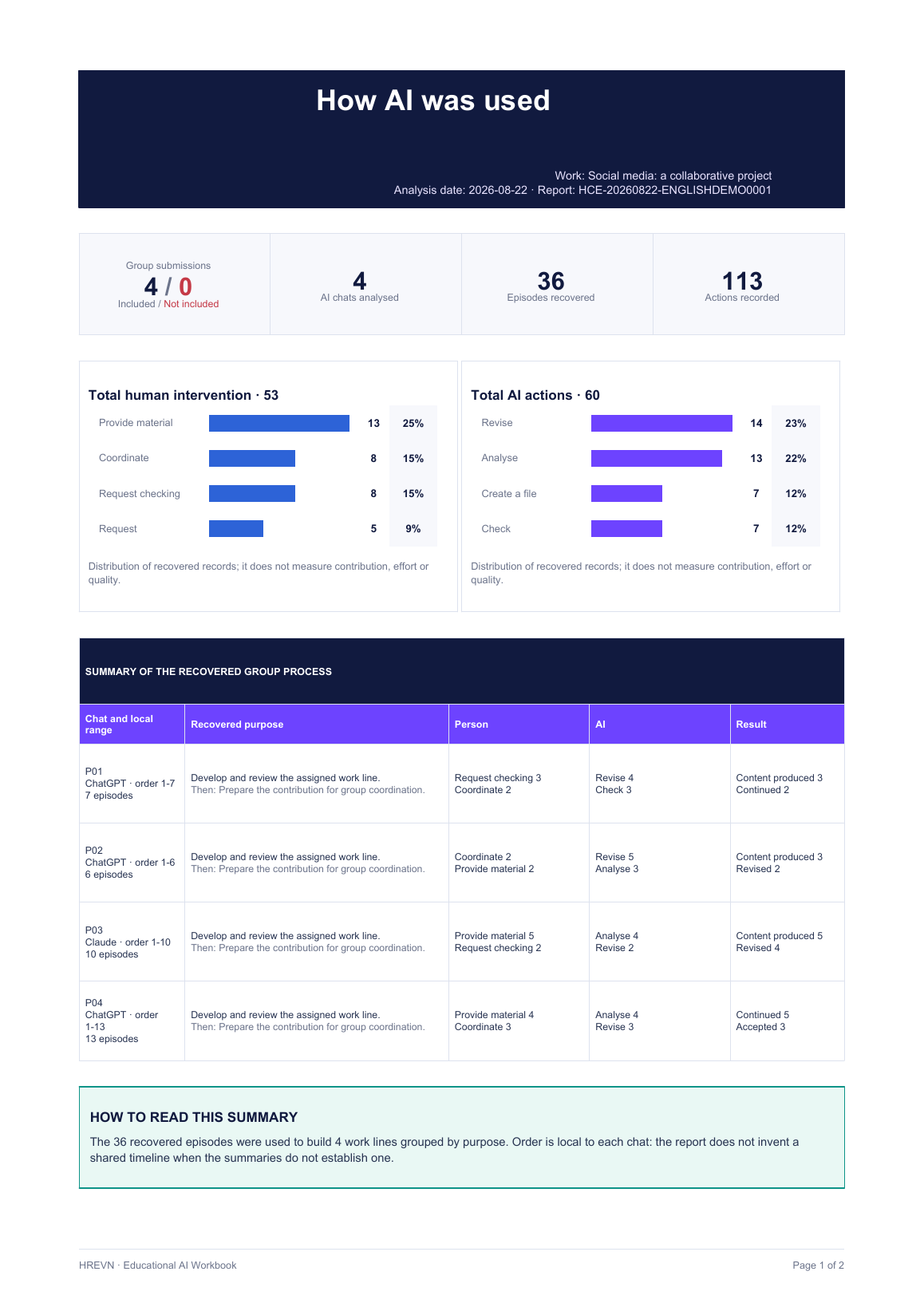
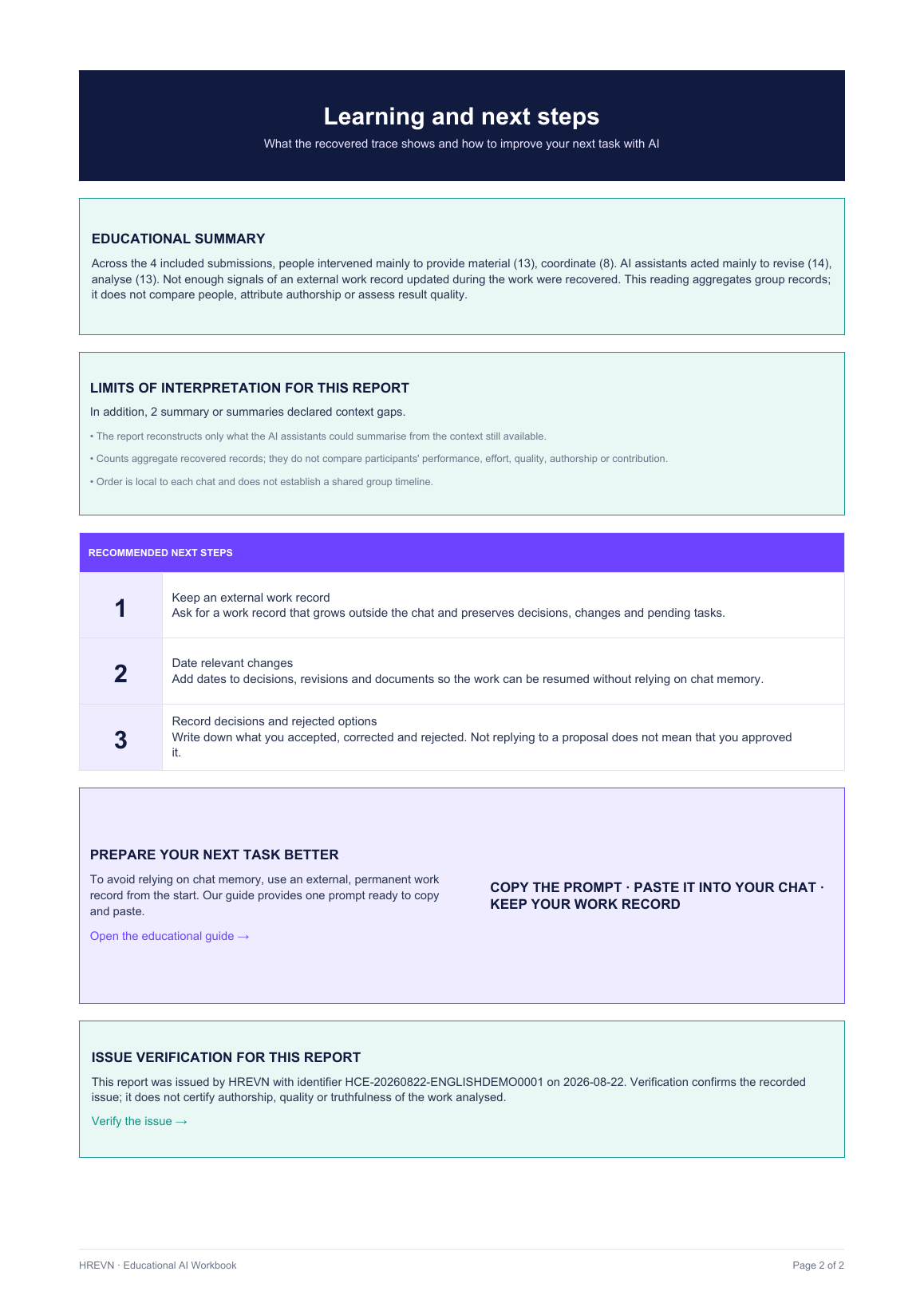
These two pages show the result of a simulated group case. Open either image to read it at full size.
Two ways to build AI skills
Review a completed AI workflow or take control from the start
Use it for a one-off query, a long task or a group project: look back at the process or change your habits before opening the next chat.
Analyse a completed task
Ask each assistant for a structured summary of what it can still see. HREVN validates those text files and builds a joint reading without inventing fragments that no longer exist.
- Human interventions and AI actions.
- Recovered decisions, corrections, continuations and working practices.
- Gaps explained in plain language.
- Practical recommendations for the next task.
Prepare a new task
Copy one prompt at the beginning. The assistant will test how it can preserve an accumulating work log outside the chat and, if it cannot save it directly, will provide a downloadable file or the complete text.
- The same log can resume in another chat while preserving its visible state, decisions and numbering.
- Clear distinction between what the person decides and what AI proposes.
- Updates when there is a decision, correction or new file.
- A clear close separating completed and pending work.
The real problem
A useful AI workflow needs more than chat history
Conversations can grow, split across assistants or continue on different days. Memory features vary by service, plan and configuration, and do not guarantee that every decision will remain available when you try to reconstruct the process weeks or months later.
A response can also be well written yet incomplete, confuse the context or contain incorrect information. If no record is kept of what the person requested, checked and decided, the final result says very little about how it was reached.
HREVN does not promise to recover what has already been lost. It makes the remaining trace visible, acknowledges gaps and helps you create a better record next time.
Incomplete context
The assistant may not retain or recover every earlier step.
Scattered work
One project can end up spread across several chats and people.
Responses need review
A fluent response does not prove that its facts or sources are correct.
Invisible decisions
Without a record, accepting, correcting or discarding proposals leaves little recoverable trace.
No technical knowledge required
From chat to educational report in three steps
JSON is simply a structured text file. Your own assistant prepares it and explains what it contains.
Copy the prompt
Paste it into each AI chat you used. You do not need to adapt it or write code.
Validate the summaries
Attach the file or paste the text. If it does not comply, you will know why and how to try again.
Save the report
Receive a visual, educational and verifiable reading of the traces that could be recovered.
A reading, not a score
The report focuses on the human–AI relationship
The purpose is not to catch anyone out or decide who worked more. The report shows, in aggregate, how human intervention appears, which functions AI performed and which documentation practices could be observed.
In groups, each submission remains linked to an anonymous code. The coordinator can close with the people who confirmed their information, and the report records how many submissions were included and excluded.
- Visual: simple charts of human intervention and AI actions.
- Narrative: a summary of work lines, decisions and continuity.
- Honest: explains what is missing without turning absence into an accusation.
- Practical: suggests habits that can be applied to the next task.
- Verifiable: the PDF includes a link to verify that HREVN issued that file.
If you use AI in a professional setting
Good personal habits are the beginning. An organisation also needs shared rules.
The Workbook helps show how a person or group converses, decides and documents work with AI. When that use forms part of a business or professional activity, it is also helpful to establish which tools are allowed, which data must not be shared, who holds each responsibility and how incidents are supervised.
An AI policy does not replace these working habits, but it can turn them into shared criteria across an organisation.
View the AI policy guide for companiesThe person documents
They preserve objectives, decisions, corrections, sources and pending tasks.
The group shares criteria
It uses a shared way to review, transfer and close information.
The organisation sets rules
It defines tools, data, responsibilities, supervision and incidents.
Privacy by design
Share only what is necessary
No accounts, names or email addresses are required to use the workbook.
The current version uses only the structured summaries prepared by the chats.
The encrypted PDF is deleted after 60 minutes. Open group projects expire after 30 days.
Verification retains technical issue data, not chats, JSON files or the PDF.
Do not include personal data, confidential information or third-party content that you are not authorised to process. Read the full privacy notice and terms.
Clear limits
What this tool does not claim
It does not detect whether text was written by AI. It does not prove authorship, effort or contribution. It does not certify truthfulness or work quality. It does not compare or rank participants. It does not recover parts of a chat the assistant can no longer see. It does not replace human review or judgement.
Frequently asked questions
Before creating your workbook
What is the Educational AI Workbook?
It is a free tool for anyone. It reconstructs, as an educational reading, how a person or small group worked with one or more AI assistants. It summarises interventions, decisions, AI actions, gaps and recommendations in an easy-to-read report.
What is the JSON file I need to provide?
It is a structured text file. Your own AI assistant prepares it after receiving the HREVN prompt. You can download it or copy and paste its content; no programming knowledge is required.
Does it work with ChatGPT, Claude, Gemini or other assistants?
Yes. You can declare ChatGPT, Claude, Gemini or another AI. The system accepts up to three chat summaries per person, even if the chats come from the same service.
Does it analyse the final deliverable?
No. The current version analyses only the structured chat summaries. This reduces friction and means that you do not need to share the final deliverable or its content.
Can it be used for group work?
Yes. A coordinator can create anonymous access links for up to four participants. Each person confirms their own summaries and the coordinator decides when to close the project with the available submissions.
What happens if the AI returns an incorrect JSON file?
HREVN rejects it and explains possible causes. It is not included with limitations or mixed with valid files. You can replace it or continue with the summaries that passed validation.
Does the report prove authorship or detect AI-written text?
No. It is not an AI detector, does not certify authorship, effort, quality or truthfulness, and does not score people. It describes only recoverable traces and their limits.
Does HREVN retain the chats or PDF?
HREVN does not receive complete chats. For individual use, JSON files are processed during generation and are not retained as project content. In groups they may remain encrypted until closure or for a maximum of 30 days. The encrypted PDF is available for 60 minutes and is then deleted.
Start without registering
Turn any use of AI into an opportunity to learn
Review a completed task or copy the prompt that will help you preserve the next one more effectively.